PC Printing Helper for CloudPOS.vu Web

CloudPOS-WebPrinting connects CloudPOS.vu Web to your receipt printer

CloudPOS-WebPrinting is a small application that runs on a PC and allows CloudPOS.vu in the Web browser to print directly to receipt printers. It is designed for businesses that want Web-based CloudPOS.vu with reliable local receipt printing.
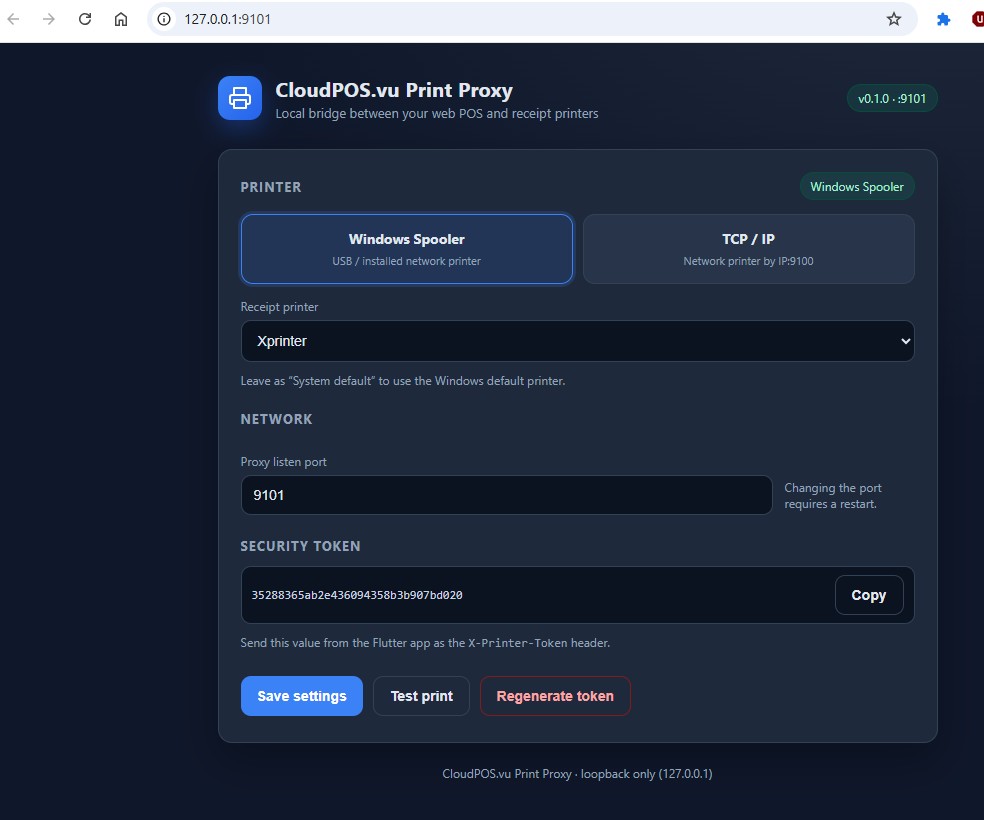
CloudPOS-WebPrinting configuration screen

The helper runs on the same PC as your browser and provides the local bridge between CloudPOS.vu Web and supported receipt printers.

Why this application exists

Standard web browsers do not have the direct printer access needed for receipt printing workflows. CloudPOS-WebPrinting solves that by running locally on the PC, receiving the print request from CloudPOS.vu Web, and sending it to the configured receipt printer.

Direct local printing

Send receipts from CloudPOS.vu Web to supported receipt printers connected to the local PC environment.

Built for browser POS

Use CloudPOS.vu in the browser on PC while still keeping proper receipt printer output for daily sales operations.

Simple and controlled

Run the helper on the same PC, pair it with CloudPOS.vu, test the printer, and keep configuration under your control.

How it works

The setup is simple and designed for real POS terminals.

1. Run it on the PC

Install and run CloudPOS-WebPrinting on the Windows PC that is using CloudPOS.vu in the browser.

2. Connect the printer

Choose the receipt printer using Windows printer selection or direct network printer settings where supported.

3. Pair it with CloudPOS.vu

Use the local helper details inside CloudPOS.vu Web so the POS can send print jobs safely to the local machine.

Need setup details?

The full user manual explains installation, configuration, pairing with CloudPOS.vu Web, service mode, tray mode, and troubleshooting for local receipt printer printing.

Open CloudPOS-WebPrinting Manual